
Best Private Browsers for Android in 2025 (And Which One You Should Actually Use)

Chrome comes pre-installed on most Android phones, and it works fine—if you don’t mind Google tracking every site you visit. For everyone else, there are browsers that actually respect your privacy without requiring a computer science degree to configure.
This guide cuts through the noise. We’ll cover the best options whether you’re running a stock Samsung, a degoogled Pixel, or something in between.
Quick Picks
| Category | Browser | Play Store | F-Droid | Why It Wins |
|---|---|---|---|---|
| Best for Most People | Brave | ? Available | ? | Strong privacy defaults, just works |
| Best for Maximum Privacy | IronFox | ? | ? Custom Repo | Hardened Firefox with all the right tweaks |
| Best for Chromium Users | Cromite | ? | ? Custom Repo | Privacy-focused Chromium without Brave’s baggage |
| Best for Firefox Users | IronFox | ? | ? Custom Repo | Full extension support, Firefox Sync |
| Best for Degoogled Phones | Vanadium / Cromite | ? | ? Pre-Installed ? Custom Repo | OS integration (GrapheneOS) / works everywhere else |
| Best for Beginners | DuckDuckGo | ?Available | ?Available | Simplest privacy UX, no configuration needed |
How We Picked These
We synthesized recommendations from Privacy Guides, community consensus on r/fossdroid and r/PrivacyGuides, and hands-on daily use. Where possible, we link to source code repositories, Exodus Privacy reports, and audit documentation. We’re clear about what’s research-based versus direct experience.
Best for Most People: Brave
Free · Chromium-based · Play Store available
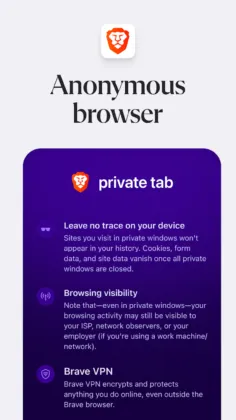
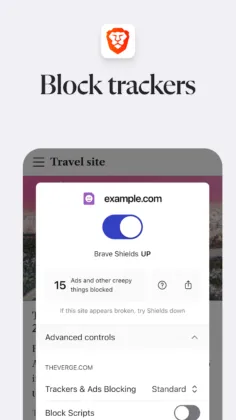
Brave is the browser we’d recommend to someone switching from Chrome who wants meaningful privacy improvement without friction. It’s the only private browser that Privacy Guides officially recommends that you can grab directly from the Play Store with automatic updates.
The built-in ad and tracker blocking (“Shields”) works out of the box—no extensions to install, no settings to hunt down. Fingerprint randomization makes it harder for sites to identify you across the web. HTTPS upgrades happen automatically. YouTube ads get blocked. For most people, this alone justifies the switch from Chrome.
Brave runs as a daily driver even on degoogled setups. On GrapheneOS and CalyxOS, it works without issues alongside sandboxed Play Services—or without Play Services entirely. The tab groups feature is genuinely useful for keeping browsing organized, and Sync works well for sharing bookmarks and tabs across devices.
The catch: Brave has crypto baggage. The BAT rewards system, built-in wallet, and occasional prompts to enable Brave Rewards are annoying if you’re not interested in cryptocurrency (and you probably shouldn’t be). The company has had controversies—a 2020 incident where affiliate codes were auto-inserted into URLs, earlier issues with accepting donations on behalf of creators who hadn’t signed up. These were resolved, but they’ve left some privacy advocates wary. You can disable all the crypto stuff, but the fact that it exists at all bothers purists.
Best for: Anyone upgrading from Chrome who wants privacy improvements without learning a new ecosystem or dealing with custom app repositories.
Source: GitHub (partial—some components are proprietary) · Privacy Policy
Best for Maximum Privacy: IronFox
Free · Firefox/Gecko-based · F-Droid (custom repo) or Accrescent
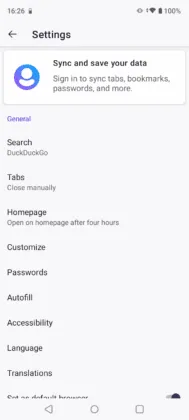
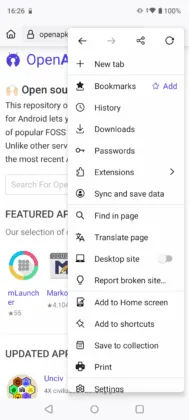
IronFox emerged in January 2025 as the successor to Mull after DivestOS was discontinued in December 2024. It carries forward all of Mull’s privacy patches and adds more from the Phoenix project for desktop Firefox. If you want the most aggressively privacy-hardened browser that’s still practical for daily use, this is it.
The hardening is substantial: telemetry completely stripped, enhanced tracking protection set to strict by default, Fission (site isolation) enabled, and uBlock Origin comes built-in with custom filter lists. Unlike stock Firefox, there are no connections back to Mozilla that could potentially track you. The r/fossdroid community consensus is that IronFox “not only incorporates all the security enhancements from Mull but also surpasses it with additional patches.”
Full Firefox extension support means you can add whatever privacy tools you want on top of the hardened defaults. Firefox Sync works if you want it—bookmark and tab sync across devices without relying on a third party.
The catch: You can’t get IronFox from the Play Store. You’ll need to add the IronFox F-Droid repository or install via Accrescent (which the developers recommend). Some users report occasional slowness compared to Chromium browsers, and Firefox’s rendering engine means some sites don’t look quite right. These are minor issues for the privacy-conscious, but they’re real tradeoffs.
Best for: Users who want maximum privacy hardening and are comfortable installing from F-Droid or sideloading. The natural choice for former Mull users.
Source: GitLab · GitHub
Best for Chromium Users: Cromite
Free · Chromium-based · F-Droid (custom repo)
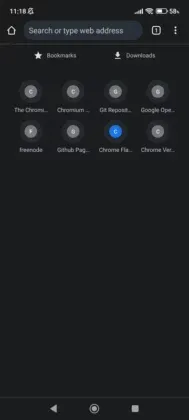
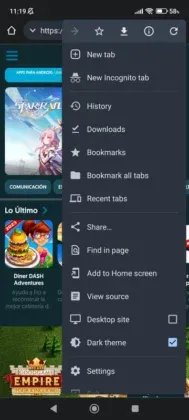
If you want Chrome’s compatibility and speed without Brave’s crypto ecosystem, Cromite is your answer. It’s the direct successor to the beloved Bromite browser (which was abandoned in 2022) and carries Privacy Guides’ official recommendation alongside Brave.
Cromite is fully FOSS—no proprietary elements, no VC-backed company pushing monetization features. Built-in ad blocking works via the Adblock Plus engine with EasyList. DNS-over-HTTPS is supported. There’s an always-incognito mode if you want it. The browser removes click tracking and AMP redirection from search results automatically.
CalyxOS uses Cromite patches for their default Chromium browser, which is a solid endorsement. Cromite also provides a WebView replacement for system-wide ad blocking beyond just the browser.
The catch: No extension support on stable builds yet. An alpha version with Chrome extension support dropped in November 2025, which is exciting, but it’s not ready for most users. You’ll also need to add Cromite’s custom F-Droid repository—it’s not in the main repo. The UI feels more utilitarian than Brave’s polish.
Best for: Users who want Chromium without crypto baggage, FOSS purists, and anyone who philosophically objects to VC-backed browser companies.
Source: GitHub · F-Droid Repo Instructions
Best for Firefox Users: IronFox
Free · Firefox/Gecko-based · F-Droid (custom repo) or Accrescent
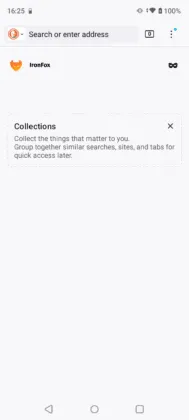
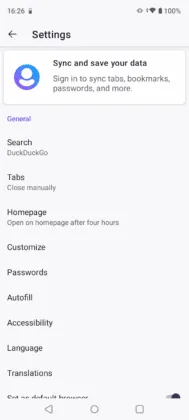
If you’re already invested in Firefox—using Sync, comfortable with the interface, relying on specific extensions—IronFox is the obvious Android choice. It’s Firefox with privacy hardening baked in, rather than Firefox with privacy configurations you have to do yourself.
All your Firefox extensions work. Firefox Sync works. The UX is familiar. But unlike stock Firefox or Fennec, IronFox ships with aggressive privacy defaults out of the box: strict tracking protection, telemetry stripped, Fission enabled, uBlock Origin pre-installed.
The alternative here is Fennec F-Droid, which is Firefox with proprietary bits and telemetry removed but without the additional hardening. Fennec is fine, but it still connects to various Mozilla services that can track users, and you’ll need to manually configure about:config for equivalent privacy. IronFox does the work for you.
The catch: Same as the Maximum Privacy section—requires F-Droid custom repo or Accrescent installation, occasional speed tradeoffs versus Chromium, and some site rendering quirks. If you specifically want a lighter-touch approach (Firefox minus telemetry, not Firefox plus hardening), Fennec might be your preference.
Best for: Firefox users who want their existing workflow with better privacy defaults. Anyone already using Firefox Sync who wants a mobile option that doesn’t compromise.
Best for Degoogled Phones: Vanadium (GrapheneOS) / Cromite (Others)
Free · Chromium-based
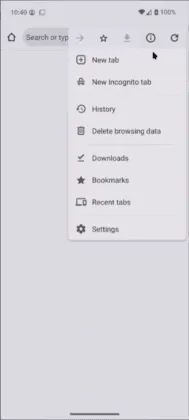
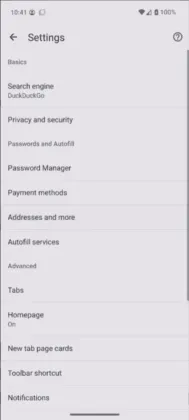
This category has a split recommendation because “degoogled phone” means different things depending on your ROM.
If you’re on GrapheneOS: Use Vanadium. It’s GrapheneOS’s integrated browser and WebView, hardened at the OS level in ways third-party browsers can’t match. The GrapheneOS developers explicitly recommend it. Vanadium benefits from GrapheneOS’s hardened memory allocator and other security features that are tightly coupled to the OS. You can’t install Vanadium on other ROMs—it’s GrapheneOS-exclusive.
If you’re on CalyxOS, LineageOS, or other degoogled ROMs: Use Cromite. CalyxOS actually uses Cromite patches for their default browser, so you’re getting an endorsed option. Cromite’s WebView replacement also provides system-wide ad blocking, which is particularly useful on degoogled setups where you’re not relying on Play Services.
That said, plenty of GrapheneOS users run Brave or IronFox as their daily driver alongside Vanadium. Vanadium is the “secure default” for sketchy sites and logins; a feature-richer browser handles everyday use. This multi-browser approach—dedicated browsers for different use cases like keeping Instagram isolated—works well on privacy-focused setups.
The catch: Vanadium is GrapheneOS-only, so if you’re not on GrapheneOS, it’s not an option. Cromite requires adding a custom F-Droid repo. Neither has extension support (though Cromite’s alpha is getting there).
Best for: GrapheneOS users (Vanadium), CalyxOS/LineageOS users (Cromite), or anyone running a degoogled ROM who wants browser recommendations that actually work with their setup.
Best for Beginners: DuckDuckGo Browser
Free · Android WebView-based · Play Store available
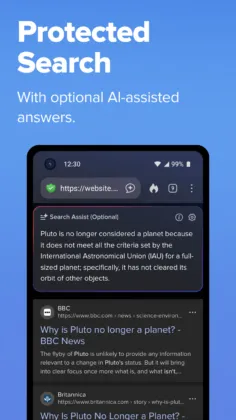
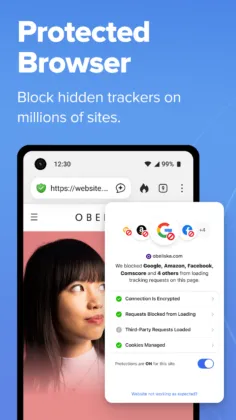
DuckDuckGo is the browser to recommend to your parents or friends who “don’t want to be tracked” but aren’t going to configure anything. The privacy features are visible and understandable: there’s a Fire Button that clears everything with one tap. Tracker blocking happens automatically. The app tells you how many trackers it blocked on each site.
With over 50 million Play Store downloads, DuckDuckGo has mainstream accessibility that FOSS alternatives don’t. It’s the easiest on-ramp to private browsing, and for someone coming from Chrome with zero privacy protection, it’s a substantial upgrade.
The Email Protection feature (free @duck.com forwarding addresses that strip trackers from emails) and Duck Player (ad-free YouTube viewing) are nice additions that extend privacy beyond just browsing.
The catch: DuckDuckGo caught heat in 2022 when security researchers discovered Microsoft trackers weren’t being blocked due to a search syndication agreement. This was largely resolved by August 2022, but it damaged trust among privacy purists. The browser uses Android WebView rather than its own engine, which limits capabilities. No extension support. The fingerprinting protections are less comprehensive than Brave or IronFox.
Best for: Privacy beginners who want something simple from the Play Store. A good “session browser” for quick private tasks. Not recommended as a primary browser for serious privacy users.
Source: GitHub (partially open source) · Privacy Policy
FAQ
What about Firefox / Firefox Focus?
Stock Firefox is a reasonable option if you’re willing to configure it. Out of the box, telemetry is enabled, the default search is Google (Mozilla gets $400M+ annually from that deal), and you’ll want to install uBlock Origin and tweak about:config settings. It’s not bad—it’s just not optimized for privacy without work.
Firefox Focus is still maintained but has fallen out of favor. It’s a single-tab browser without extension support, designed for quick private sessions rather than primary use. For that use case, DuckDuckGo now fills the niche better.
If you want Firefox’s engine and workflow, IronFox does the privacy configuration for you and ships with better defaults.
What about Tor Browser?
Tor Browser is the right choice if you need anonymity—hiding your IP address and identity, not just blocking trackers. It routes traffic through the Tor network, making it much harder to identify you. This is essential for journalists in sensitive situations, activists, or anyone with a serious threat model.
For everyday browsing, Tor is overkill. It’s slow (traffic bounces through multiple nodes), some sites block Tor exit nodes, and using it for accounts that identify you defeats the purpose. The Tor Browser for Android is available on both Play Store and F-Droid if you need it.
What happened to Mull and Bromite?
Both are discontinued.
Mull was part of DivestOS, which shut down in December 2024. IronFox is the direct successor—it carries forward Mull’s patches plus additional hardening.
Bromite was abandoned in 2022. The original developer stopped updating without explanation. Cromite is the maintained fork, built by a former Bromite contributor.
If you’re still running either browser, update immediately. Abandoned browsers don’t get security patches.
Do I need to install from F-Droid, or can I use the Play Store?
It depends on the browser:
- Play Store available: Brave, DuckDuckGo, Firefox, Tor Browser
- F-Droid (main repo): Fennec, Tor Browser
- F-Droid (custom repo required): IronFox, Cromite
- GrapheneOS only: Vanadium
For browsers requiring custom repos, you’ll need to add the repository URL to F-Droid manually. It’s a one-time setup—once added, updates work normally. Alternatively, Obtainium can track GitHub releases for direct APK updates.
What’s the deal with Brave and crypto?
Brave integrates a cryptocurrency rewards system (BAT tokens) and a built-in wallet. You can use Brave Rewards to earn tokens by viewing privacy-respecting ads, which you can then tip to content creators or convert to cash.
Most users don’t care about this and find the occasional prompts annoying. The good news: you can ignore or disable all of it. The crypto features are optional and don’t affect the browser’s privacy protections.
The concern for some users is philosophical—a browser company with a crypto business model has incentives that may not always align with user interests. Brave’s past controversies (affiliate link insertion, donation acceptance issues) haven’t been repeated, but they’re part of the company’s history.
Will these browsers work on my Samsung/Pixel/stock Android phone?
Yes, all of them. Brave, DuckDuckGo, and Firefox are Play Store apps that work like any other. IronFox and Cromite require sideloading or F-Droid but run fine on stock Android.
The only exception is Vanadium, which is GrapheneOS-exclusive.
The Bottom Line
Just want something better than Chrome? Get Brave. It’s on the Play Store, works immediately, and blocks ads and trackers by default.
Want maximum privacy and don’t mind F-Droid? Get IronFox. It’s the most hardened option that’s still usable as a daily driver.
Want Chrome-like compatibility without Brave’s crypto stuff? Get Cromite. Fully FOSS, no corporate baggage, solid privacy defaults.
On GrapheneOS? Use Vanadium as your secure default. Add Brave or IronFox for daily browsing if you want extensions or features.
Privacy-curious but not technical? Get DuckDuckGo. It’s simple, it’s on the Play Store, and it’s a real improvement over Chrome.
Need actual anonymity? Tor Browser. Nothing else routes your traffic through an onion network.
Last updated: November 2025. Privacy browser recommendations change fast—Mull’s discontinuation in December 2024 reshuffled these picks significantly. We’ll update this guide as the landscape evolves.